Build a reusable AI briefing in Obsidian
Creating five context notes is enough to begin. It does not yet solve the problem you face before a real conversation: finding the few current lines that belong together.
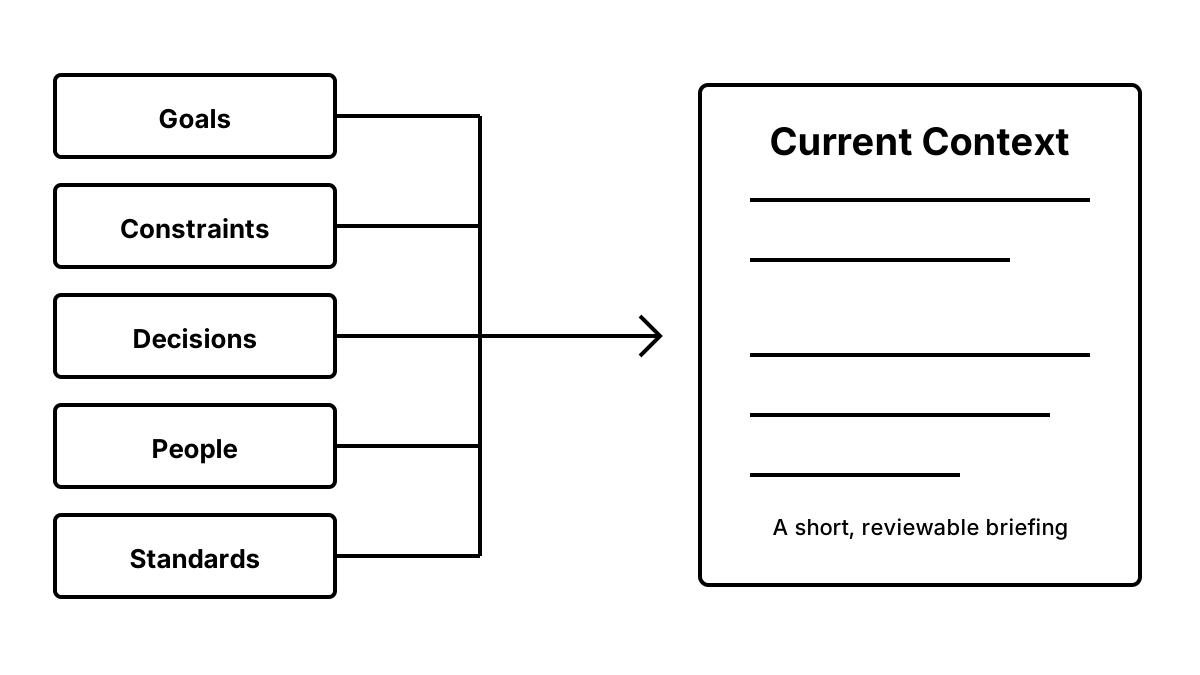
The next layer is not another folder system. It is one temporary briefing note called Current Context.
Your five source notes keep information by type. Current Context assembles a small, current view for one project or decision. The source notes remain the record; the briefing is a working selection.
Start here only after the five files exist
If you have not created a vault or the five notes yet, use the ten-minute Obsidian setup. If the files exist but are still mostly empty, use the filled five-note templates.
This article begins at the next problem: the information exists, but it is scattered across Goals, Constraints, Decisions, People, and Standards.
Create one Current Context note
Inside the project you are working on, create current-context.md:
# Current Context — [project or decision]

Updated: YYYY-MM-DD
Review when: [date or condition]

## Outcome
- What are we trying to achieve now?

## Constraints
- What cannot change during this decision?

## Decisions carried forward
- What have we already chosen or ruled out, and why?

## People and standards
- Whose needs or quality bar changes the answer?

## Open question
- What exactly needs to be decided next?

## Decision after consultation
- Chosen:
- Rejected and why:
- Revisit when:
The Updated and Review when lines matter. A briefing without a freshness signal can become confidently wrong after the source notes change.
Link to sources instead of copying their history
Current Context should remain short. Link each selected line back to the source note when you need the history:
## Constraints
- Keep the two existing clients on their current rates this quarter. Source: [[constraints]]

## Decisions carried forward
- Do not use an across-the-board increase; it cost us a valued client. Source: [[decisions]]
Do not copy every entry from the source. The briefing answers “What is true for this decision now?” The source note answers “What have we recorded about this category over time?”
That separation prevents a common failure: an AI handoff containing three years of decisions when only the current boundary matters.
Refresh the briefing at three moments
Update Current Context when:
1. A decision begins. Select the outcome, active constraints, and relevant history. 2. A material fact changes. Replace the stale line and update the date. 3. The consultation ends. Record the chosen option, rejected option and reason, and the condition for revisiting it.
You do not need a daily maintenance ritual. The note changes when the decision changes.
Hand off a selection, not the note automatically
Current Context is reviewable input, not permission to send everything. Before pasting, remove source links and select only the lines that can change the answer. Apply your Give, Blur, Keep local, or Never share policy, then follow the step-by-step handoff.
After you act, return the decision to decisions.md. Current Context can then be closed, archived, or refreshed for the next question.
The result is a two-layer system:
- Five source notes preserve reusable context by type.
- Current Context assembles the temporary briefing for one live decision.
That is the role of this setup. It does not replace the five-note starter system, and it does not teach the Obsidian interface from scratch.
Verify the setup with one real question
The setup is complete when it produces a small, inspectable handoff—not when the folders look finished. Run this test:
1. Open current-context.md without searching the rest of the vault. 2. Confirm that Updated and Review when contain real values. 3. Read each line and remove anything that cannot change the answer. 4. Replace identifying details with safe descriptions where needed. 5. Copy Outcome, Constraints, Decisions carried forward, and Open question into a blank chat. 6. After reviewing the response, complete Decision after consultation yourself. 7. Move the durable decision and its reason back to decisions.md.
Use this completion record:
# Current Context setup check

- [ ] Five source notes exist
- [ ] Current Context names one live decision
- [ ] Updated date is current
- [ ] Review trigger is specific
- [ ] Every included line can change the answer
- [ ] Sensitive details were removed or kept local
- [ ] The final decision returned to decisions.md
If you cannot complete one checkbox, fix that point rather than adding another plugin or folder. The Markdown structure above is the working completion test.